Best Lighting for Watching TV Without Glare

A lamp reflected in the television can ruin a dark movie scene, while watching with every light switched off can make the screen feel uncomfortably bright against the surrounding room. Neither problem necessarily calls for a new television or expensive lighting system.
The best lighting for watching TV usually combines controlled daylight, softly diffused light away from the screen and, where useful, a dim light behind the television. The trick is to illuminate the room without directing light toward the display or into your eyes.
Why Your TV Reflects the Room
Television glare isn’t one problem with one solution. A bright window reflected in the screen, an exposed bulb shining toward your face and a television surrounded by complete darkness create different viewing conditions.
Direct glare comes from a bright source entering your field of vision. Reflected glare occurs when light bounces off the television toward your seating position. Excessive contrast happens when the screen is much brighter than its surroundings, making the viewing environment feel harsh even without obvious reflections.
| What you notice | Likely cause | Best first adjustment |
|---|---|---|
| A clear window shape on the screen | Direct reflection of daylight | Close or adjust blinds; reconsider screen position |
| A bright spot during dark scenes | Lamp or ceiling fixture reflected in the display | Move, dim or redirect the light |
| A broad, washed-out area | Diffused reflections or excessive room light | Reduce light falling directly on the screen |
| An uncomfortably bright screen in a dark room | Large brightness difference between display and surroundings | Lower screen brightness or add soft background light |
| A visible bulb near the television | Direct glare in your field of vision | Shield the bulb or move the fixture |
RTINGS, which measures television reflection handling, distinguishes between intense mirror-like reflections and light scattered across a screen. Glossy displays tend to produce more defined reflections, while matte finishes spread reflected light more diffusely. Neither finish makes thoughtful room lighting unnecessary.
Window Reflections
A television facing a large window can remain difficult to watch even with the room lights switched off. During daytime viewing, the window may become the brightest object reflected in the display.
Where possible, position the screen perpendicular to the main window rather than directly opposite it. This often reduces reflections without sacrificing all the natural light.
If the furniture layout is fixed, adjustable blinds or lined curtains offer more control. Sheer curtains can soften daylight, but they may not sufficiently reduce a strong reflection on a glossy screen.
Pay attention to changing sunlight. A setup that works during a summer evening may behave differently during a bright winter afternoon when the sun sits lower in the sky.
Lamps and Ceiling Fixtures in the Screen
A lamp doesn’t have to point directly at the television to appear in its reflection.
Sit in your usual viewing position and look at the screen while it is switched off. Its dark surface makes reflected windows and fixtures easier to identify.
Switch lamps off individually. If one reflected bright spot disappears, you’ve found the source.
Ceiling pot lights can create the same problem, particularly when positioned between the seating area and television. Dimming may make reflections less distracting, but changing the light’s direction or switching off that particular fixture is often more effective.
The Best Places to Put Lights Around a TV
The most useful locations are generally behind the television, to the sides of the seating area or elsewhere outside the screen’s reflective path.
There isn’t one universal floor plan. The correct position depends on the viewing angle, window location, screen finish and furniture.
Behind the TV
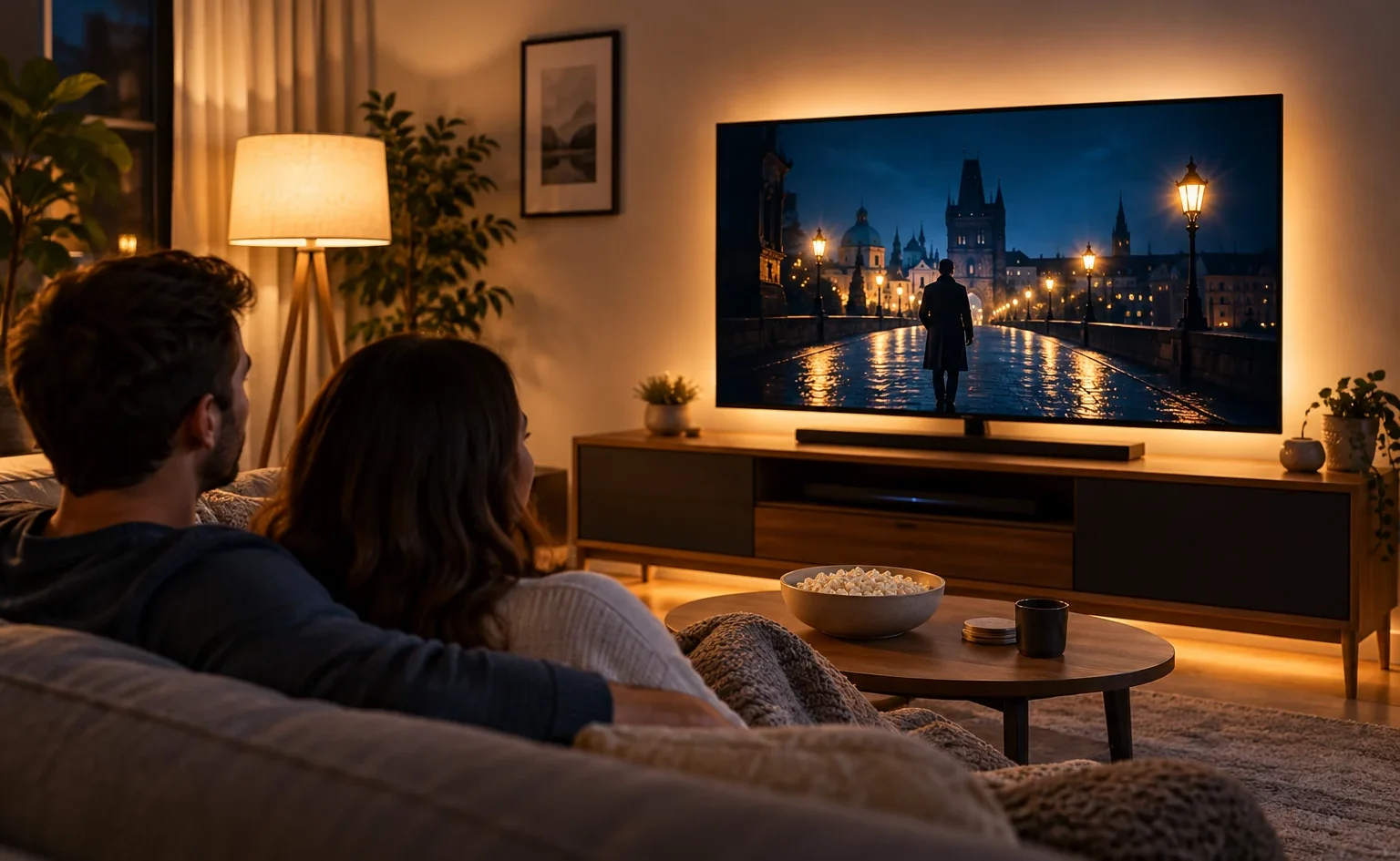
A soft glow on the wall behind the television provides background illumination without placing a visible lamp directly in front of the screen.
This works particularly well for evening viewing, when a bright display would otherwise be surrounded by darkness.
LED strips attached to the rear of the television are one option. A small lamp hidden behind the media console can create a similar effect if its light reaches the wall evenly.
The wall colour matters. A pale, matte wall reflects light more readily than a dark one, while textured surfaces can create uneven patches of brightness. Adjust the light accordingly rather than assuming one LED setting will work everywhere.
Beside the Seating Area
A shaded table lamp or floor lamp can make the room comfortable without interfering with the television.
Imagine a sofa facing a wall-mounted screen. A good starting position is a shaded lamp beside or slightly behind the sofa, aimed toward the wall or reading area rather than the television.
Avoid placing an exposed bulb where it is visible just beyond the screen. Even if it doesn’t create a reflection, that bright point can compete with the picture.
In a small apartment, one well-positioned lamp may provide enough background light for casual television viewing.
Above the Screen or on the Ceiling
Recessed lights are useful for general illumination, but their placement matters.
A row of downlights directly in front of the television can create reflections across the display. Adjustable fixtures directed toward surrounding walls may be more practical.
Wall-washing light can brighten the room without sending a concentrated beam toward the screen.
Where ceiling lights already have separate controls, keeping those closest to the television off during movies may solve the problem without any new fixtures.
Bias Lighting vs Regular Room Lighting
Bias lighting and ordinary lamps serve different purposes. Bias lighting creates a controlled illuminated background around a screen; room lighting helps people move around, read and use the space for other activities.
| Feature | Bias lighting | Regular room lighting |
|---|---|---|
| Main purpose | Soft illumination surrounding the display | General visibility and everyday activities |
| Typical location | Behind the television | Beside seating, on furniture or near walls |
| Effect on direct reflections | Does not remove them | Depends on placement and direction |
| Best situation | Evening screen-focused viewing | Multipurpose living rooms |
| Main limitation | Does little for the rest of the room | Poor placement can create glare |
What Bias Lighting Actually Does
Bias lighting illuminates the wall around the television, making the transition between the bright picture and the surrounding darkness less abrupt.
For colour-critical viewing, professional guidance uses a D65 white reference, approximately 6500K. Dolby’s guidance for professional Dolby Vision content creation specifies D65 bias lighting because the surrounding light can influence perceived colour.
That doesn’t mean every living room needs 6500K bulbs. Nor does a colourful RGB strip automatically qualify as accurate bias lighting.
For ordinary home viewing, the practical priorities are modest brightness, even coverage and avoiding visible LED dots or strong reflections. A dimmable, neutral-white setup is generally more useful for consistent viewing than constantly changing coloured effects.
Bias lighting also cannot remove sunlight reflected on the front of a television. That problem still requires controlling the window or changing the viewing geometry.
When a Normal Lamp Works Better
A dedicated LED strip may be unnecessary if the room already has a shaded lamp providing gentle indirect light.
Suppose the television sits beside a bookshelf and the sofa is several feet away. A small lamp on the bookshelf, directed toward the wall rather than the screen, may create a comfortable background without additional hardware.
Ordinary lamps are also more practical when someone wants to read, use a laptop or move around while the television is playing.
If the space serves several purposes, improve the existing room lighting before investing in specialised screen lighting.
Choose the Right Brightness and Colour
TV lighting should be bright enough to make the surroundings comfortable but subdued enough that it doesn’t compete with the picture.
Begin with the television’s own brightness settings. A display adjusted for a sunny afternoon may look unnecessarily intense at night. On many LED televisions, the relevant control is called Backlight or a similar screen-brightness setting; OLED models use controls such as OLED Pixel Brightness. These are different from black-level adjustments, which can affect shadow detail.
RTINGS recommends adjusting screen light output to suit the viewing environment rather than relying on one brightness setting for every room.
For surrounding lamps, 2700–3000K typically provides a warm, welcoming appearance. This works well in living rooms where the television shares space with conversation, reading and relaxing.
The 6500K reference used for colour-accurate bias lighting is a separate consideration. It’s relevant when preserving the intended appearance of video content matters, not a requirement to illuminate the entire room with cool white light.
Use dimmers where possible. A softly lit room with adjustable lamps gives you more control than a combination of extremely bright fixtures and complete darkness.
Also consider surfaces. Glossy furniture, glass picture frames and polished tabletops can introduce distracting reflections near the screen. Matte finishes are usually easier to manage in a television-focused seating area.
Three Practical TV Lighting Setups
Different viewing situations call for different arrangements. A bright room used for afternoon sports needs considerably more ambient light than a living room during a movie.
Daytime Viewing in a Bright Room
Picture a living room with a television against one wall and a large window opposite.
Start with the window, not the lighting fixtures.
Adjust the blinds until the strongest reflection disappears from the screen. If the room becomes too dark for other activities, reopen them gradually until you find a workable balance.
Then increase the television’s screen brightness as needed for daytime viewing, within a comfortable range.
If the screen still looks washed out, check whether light is falling directly on it from another direction. Additional LED strips behind the television will not compensate for a strong front-surface reflection.
Evening Viewing in a Small Apartment
In a compact living room, the television may face the sofa with little space left for additional furniture.
A simple arrangement can work:
- Keep the main ceiling light off if it reflects in the screen.
- Position one shaded table lamp beside or slightly behind the sofa.
- Use a low-output light behind the television if the surrounding wall otherwise remains completely dark.
Try the seating-area lamp first. If it provides comfortable background illumination, the third source may not be necessary.
For renters, portable lamps and plug-in lighting are convenient because they don’t require changes to existing wiring. Check that any LED strips and power supplies have appropriate Canadian electrical certification markings.
Movie Night in a Shared Living Room
A family movie night creates two competing requirements: the screen should remain the main visual focus, but people still need to find drinks, move around furniture and safely reach the hallway.
Keep strong overhead fixtures off during the film, then use a low-level indirect light behind the television or away from the screen.
A dimmed lamp near the room’s circulation area can help people move without flooding the screen with reflected light.
Natural Resources Canada’s Home Lighting Design Guide supports layered, separately controlled lighting for family rooms, including lower light levels for television viewing. The broader principle remains useful even though the guide includes some older lighting technologies.
The best movie setting is therefore rarely a completely dark room or a fully illuminated one. It’s a controlled arrangement that allows the television to remain prominent while preserving some useful surrounding light.
A Five-Minute Test Before Buying Anything
You can identify many lighting problems with the lamps, curtains and television you already own.
- Turn the television off. Sit in your normal viewing position and look for reflected windows, bulbs and ceiling fixtures.
- Switch off one light at a time. Notice which reflections disappear. A single badly positioned lamp may be responsible for most of the problem.
- Adjust the blinds or curtains. Check whether controlling daylight improves the picture without making the whole room unpleasantly dark.
- Turn the television back on. Display a scene with dark areas and compare how it looks under different lighting conditions.
- Adjust the room and screen brightness separately. Find a comfortable balance, then check the result from every regularly used seat.
This approach resembles the glare-detection principles described by the Canadian Centre for Occupational Health and Safety, which recommends examining reflected light from the user’s normal position and changing fixture placement before relying on brighter illumination.
If a lamp only creates a problem from one seat, repositioning that lamp may be easier than rearranging the entire room.
If the reflection remains visible with every lamp off and the curtains closed, investigate other sources such as light from an adjoining room or reflective surfaces near the television.
A new screen with better reflection handling may help in genuinely challenging rooms, but furniture placement and light control should come first.
When the TV Is Part of a Multi-Use Living Room
A television setup should not dictate the lighting for every activity in the room. It’s more useful to plan the lighting around the whole living room, then give the TV area its own low-glare evening setting.
A room that’s excellent for movie night may be too dim for reading, board games or cleaning. Conversely, the bright lighting needed for everyday activities may be distracting when watching a film.
The practical solution is to separate the functions. Keep the primary ambient lighting available for normal room use, provide focused light where people sit, and use dimmable or independently controlled lamps for television viewing.
For example, a living room might have a ceiling fixture for general illumination, a floor lamp beside the reading chair and a small indirect light behind the television. Each contributes something different, and none needs to operate at full brightness all evening.
You don’t need an elaborate smart-lighting system to manage this. Separate switches, compatible dimmers or a few carefully positioned portable lamps can provide enough flexibility.
Before buying more lighting, spend an evening observing which existing sources actually interfere with the picture. Often the most effective improvement isn’t adding another light at all. It’s moving one lamp, controlling daylight and allowing the room to be softly illuminated without shining directly onto the screen.